


Search the site

Best Arize AI Alternatives for Faster, Cleaner Machine Learning Model Monitoring

Tools like Arize AI helped set the standard for understanding how models behave in production. They catch drift, track performance, and make predictions easier to interpret at scale. But AI has moved forward, and so have the questions teams are asking.
It is no longer just about a model running. It is about the quality of its outputs, how it improves over time, and the impact it has on real users.
Here’s a closer look at the Arize AI alternatives teams are actually using today, and where each one fits depending on how you build and scale AI.
Where Arize AI Fits Best
Before looking at alternatives, it helps to understand what Arize is built for.
Arize is a machine learning observability platform designed to help teams understand how models perform once they are live. It focuses on what happens after deployment, when real-world data starts to shift and model behavior can change in ways that are not always obvious.
It tracks performance over time, monitors data drift, and surfaces patterns in predictions so teams can see when something starts to move off track. It also allows deeper inspection into individual predictions and data segments, which helps teams trace issues back to their source instead of guessing.
For teams running models in production, this kind of visibility becomes essential. It turns model behavior from something opaque into something measurable and easier to manage.
Arize fits best in workflows where monitoring, debugging, and maintaining model performance are ongoing priorities. From there, some teams layer in additional tools depending on how they evaluate outputs, iterate, and connect AI to product outcomes.
Arize AI Alternatives That Fit Different Workflows
1. Confident AI
Confident AI is built for evaluating model outputs, especially in LLM applications. It helps teams measure response quality, run structured tests, and improve results through consistent evaluation workflows.
Where it stands out:
- LLM evaluation framework that scores outputs based on defined criteria
- Automated testing workflows to track improvements and catch regressions
- Experiment tracking for comparing model versions and prompt changes
A potential drawback: It leans heavily into evaluation, so teams looking for deeper production observability may need to pair it with another tool.
Teams that will benefit most: Teams building LLM-powered products that need a clear way to test, measure, and improve output quality before and after deployment.
2. Langfuse

Langfuse is designed for teams building LLM-powered applications that need visibility into how prompts and responses behave in real time. It captures traces, logs interactions, and helps teams understand how outputs evolve as models and prompts change.
Where it stands out:
- End-to-end tracing of LLM interactions, including prompts, responses, and latency
- Open-source option that gives teams more control over data and infrastructure
- Built-in analytics to track usage patterns and identify performance issues
A potential drawback: It is more developer-focused, so teams without technical resources may find setup and ongoing use less straightforward.
Teams that will benefit most: Teams building and iterating on LLM applications that want deeper visibility and control, especially those comfortable working with developer-first tools.
3. LangWatch
LangWatch focuses on monitoring and improving LLM applications by giving teams visibility into prompt performance and output quality. It helps track how responses change over time and surfaces patterns that can guide iteration.
Where it stands out:
- Prompt-level insights that show how different inputs affect outputs
- Built-in evaluation tools to assess response quality
- Clear dashboards that make it easier to spot trends and issues
A potential drawback: It is still evolving, so some advanced features and integrations may not be as mature as more established platforms.
Teams that will benefit most: Teams working heavily with prompts who want a clearer view of performance and a faster way to refine outputs.
4. PostHog
PostHog is a product analytics platform that helps teams understand how users interact with features, including those powered by AI. While it is not built specifically for model observability, it connects AI outputs to real user behavior, giving teams a clearer picture of impact.
Where it stands out:
- Event-based tracking that shows how users engage with AI-driven features
- Funnels, retention, and session replay to understand real user journeys
- Open-source option with strong flexibility and customization
A potential drawback: It does not provide deep model-level observability, so teams may need a separate tool for monitoring model performance and drift.
Teams that will benefit most: Teams that want to connect AI features to user behavior, product decisions, and growth metrics.
5. Mixpanel

Mixpanel is a product analytics platform that helps teams track user behavior and measure how features perform over time. It is not built specifically for ML observability, but it gives clear insight into how AI-driven features influence engagement, retention, and overall product usage.
Where it stands out:
- Advanced event tracking that shows how users interact with AI features
- Funnel and retention analysis to measure impact on user journeys
- Clean dashboards that make data easy to explore and share across teams
A potential drawback: It focuses on user behavior rather than model performance, so it does not provide visibility into drift, predictions, or underlying model issues.
Teams that will benefit most: Teams that want to understand how AI features affect user behavior and product growth, especially those focused on data-driven decisions.
6. Databricks

Databricks is a unified data and AI platform that supports the full machine learning lifecycle, from data processing to model deployment and monitoring. It brings data engineering, analytics, and ML workflows into one environment, which helps teams manage everything in a single place.
Where it stands out:
- End-to-end platform that covers data, training, deployment, and monitoring
- Strong integration with large-scale data pipelines and infrastructure
- Collaborative workspace for data scientists, engineers, and analysts
A potential drawback: It can be complex to set up and manage, especially for smaller teams that do not need a full-scale platform.
Teams that will benefit most: Teams working with large datasets and complex ML workflows that want a centralized platform to manage everything from data to production.
7. Vertex AI
Vertex AI is Google Cloud’s machine learning platform that supports the full lifecycle of building, deploying, and managing models. It combines training, deployment, and monitoring tools in one environment, making it easier for teams to work within a unified system.
Where it stands out:
- End-to-end ML platform with built-in tools for training, deployment, and monitoring
- Strong integration with Google Cloud services and data infrastructure
- Support for both traditional ML models and newer AI applications
A potential drawback: It is closely tied to the Google Cloud ecosystem, which can limit flexibility for teams using other infrastructure.
Teams that will benefit most: Teams already working within Google Cloud that want a streamlined way to manage their entire machine learning workflow in one place.
8. Snowflake
Snowflake is a cloud data platform that has expanded into supporting machine learning and data applications. It allows teams to work with large datasets, build models, and run analytics in the same environment, which helps keep data and workflows closely connected.
Where it stands out:
- Strong data foundation that keeps storage, processing, and analytics in one place
- Ability to run ML workloads directly where the data lives
- Scales easily for teams handling large and growing datasets
A potential drawback: It is not focused on model observability, so teams may still need additional tools to monitor performance and detect issues in production.
Teams that will benefit most:
Teams that want to centralize data and machine learning workflows, especially those already using Snowflake as their primary data platform.
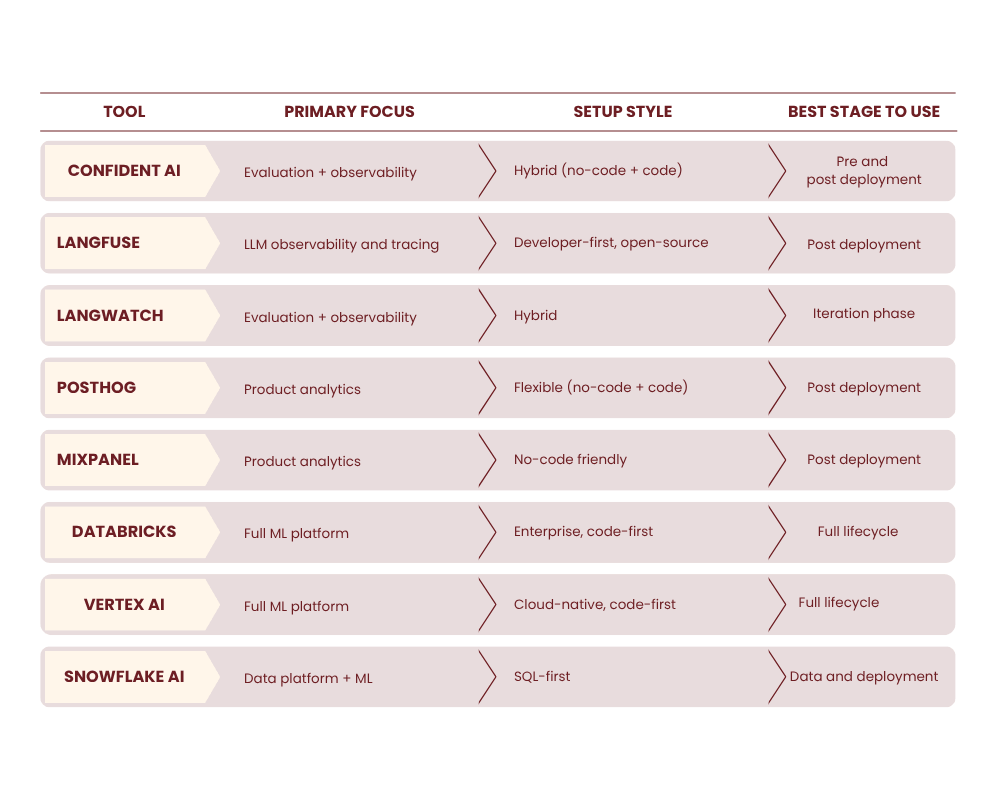
Quick Comparison: Which Tool Fits Your Workflow
How to Pick the Right Arize AI Alternative Without Overcomplicating It
Choosing a tool is less about features and more about how your team actually works. The right fit should match your pace, your setup, and how you improve models over time.
Early-Stage Teams
Focus on simplicity and speed.
Early teams move fast and test often. A complex setup slows everything down. What matters is getting visibility quickly and being able to improve without friction.
Look for tools that are easy to set up, flexible, and do not require heavy infrastructure. Open-source or lightweight options can give you enough insight without adding unnecessary overhead.
Growing Teams
Look for collaboration and analytics.
As your product evolves, more people need visibility. Engineers, product teams, and sometimes marketing all rely on the same data to make decisions.
This is where tools that combine monitoring with analytics become useful. You want to see how models behave and how those changes affect users. Shared dashboards and clear insights help teams move faster without guessing.
Enterprise Teams
Prioritize governance, security, and scale.
Larger teams handle more data and higher stakes. Performance alone is not enough. Control and structure matter just as much.
Look for platforms that support access control, data governance, and compliance. Scalability is also key, especially when models are running at high volume. The goal is to keep everything reliable while maintaining clear oversight.
The right choice is the one that fits how your team builds, tests, and improves AI without slowing you down.
Where Teams Get It Wrong When Choosing AI Tools
Even strong tools can create friction when they do not match how your team actually works. These are the mistakes that tend to slow teams down the most.
Avoiding these pitfalls keeps your setup practical, usable, and aligned with how your team improves AI over time.
Where Teams Get It Wrong When Choosing AI Tools
Arize AI set a strong foundation for model observability, and it continues to be a solid choice for teams that need clear visibility into production performance.
At the same time, the way teams work with AI has expanded. Some need deeper evaluation, others want to connect outputs to product data, and some are looking for more control over their stack.
There is no single best tool. The right choice depends on how your team builds, tests, and improves AI day to day. Start with what you actually need. Keep your setup simple. Add complexity only when it supports how your team works.
That is usually where better results come from.
Related ...






Subscribe to our insights


